RepoHub is a fast, lightweight dashboard for your GitHub repositories. It shows milestones, issues, pull requests, CI and commits, keeps itself up to date, and lives in your menu bar.
macOS 11+ · Windows 10/11 · iOS 15+ (coming soon) · MIT licensed
✓Passing◷Running✕Failing–No CI
Features
Built for people with many projects
Made in a geoscience lab, where code, field data, papers and instruments all live in different repositories.
Progress that updates itself
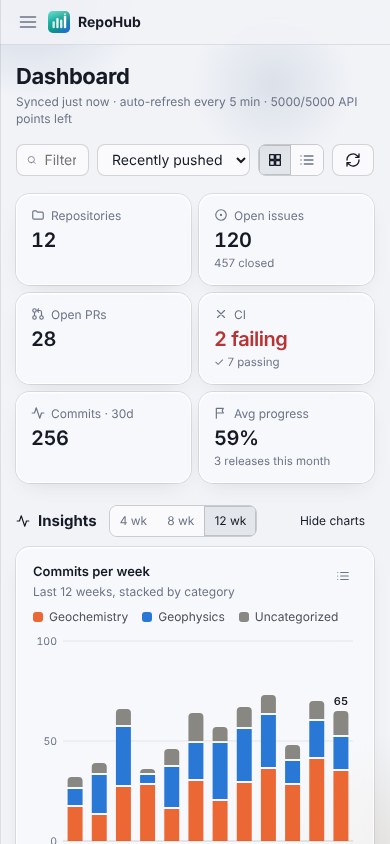
Milestone completion, issues closed, open and merged PRs, CI status, latest release and 12-week commit activity, refreshed in the background.
Charts you can click
Stacked weekly commits, an activity heatmap, progress rankings, open work by category, a milestone timeline and CI health. Each chart also has a table view.
Your own categories
Starts with Geochemistry and Geophysics. Add, rename and recolor categories as you like, and keyword rules sort repos into them automatically.
Discover ready-to-use projects
Search GitHub by topic, filtering for maintained, licensed and well-starred projects. Track them next to your own repos.
Repo icons, automatically
RepoHub reads each project's own logo or icon file. Private repos work too, and you can override any icon.
Eleven themes
Porcelain & Sapphire, Lagoon, Glacier & Slate and eight more, each with light and dark modes, on frosted glass.
Menu bar
Live stats, one click away
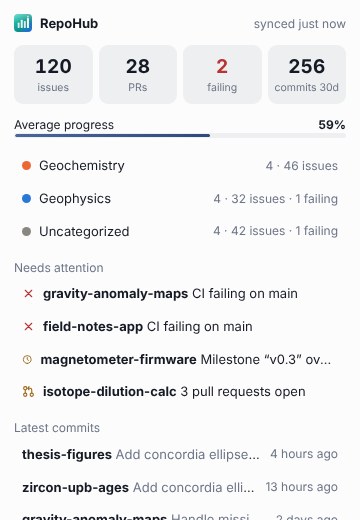
The menu bar shows the numbers you choose. Click the icon for a summary of every category, what needs attention, and the latest commits.
⊙ 42 ⑂ 7 ✕ 1
Keeps running in the menu bar or system tray after you close the window
Updates install inside the app: “Update ready — restart now?”
Stable and beta update channels
Get started
Up and running in a minute
Install
Download the .dmg (macOS) or installer (Windows) from Releases. On a Mac, the first time you open RepoHub, click Open Anyway in System Settings → Privacy & Security. Later updates install from inside the app.
Sign in with GitHub
Click one button. GitHub opens in your browser with a one-time code that's already on your clipboard. Approve, and you're in.
Organize
Your repos sort themselves into categories. Pin favorites, track projects you find in Discover, and pick a theme.
Privacy
Your data stays between you and GitHub
No RepoHub servers
The app talks directly to the GitHub API from your device. Nothing is sent anywhere else.
Where your token is kept
In the operating system's keychain (macOS/iOS Keychain or Windows Credential Manager), never in plain files.
Permissions requested
repo, to read progress on your private repositories, plus read:org and read:user for organizations and your profile. RepoHub only reads; it never changes your repositories.
Data on your device
Settings, categories and cached repo icons are stored locally. Signing out removes your token.